Introduction
This page demonstrates how Hedieh and I have used AI to improve financial modelling in a realistic and helpful manner to fix the key pain points of a financial model (Hedieh has done most of the work). She has demonstrated how to use Claude to answer a modelling test from a case and she has done a similar thing with an information memorandum. She has created a set of skills to nicely format a model. She has also used AI to review a model and do detective work on a model. On this page, I review some of how these AI tools work, but with the exception of verifying and reviewing the model, I do not think AI in financial modelling is such a big deal. For example, if you are preparing for an interview exam, you better understand how the model works and you better be able to move around excel very quickly. Most important, you better understand the reason for the various equations. In your actual work I cannot imagine letting AI make models without knowing how to make the models yourself.
I have also seen that AI can create three statement models which is not very interesting (as you may know, the idea of making a three statement model makes me vomit, because creating financial statements is really no big deal compared to things like efficiently structuring a model and understanding nuanced valuating techniques). You are probably too young to remember the world before excel and lotus. But when I reluctantly moved from programming languages to spreadsheets in the 1980’s, the fundamental reason spreadsheets were used in the first place in financial modelling is that unlike code such as python or C++, people can clearly see and follow the input data; all of the equations and easily make changes to outputs and presentation. Doing things like creating timelines, setting-up and InputC page, working through operating cash flows should go really fast. Alternatively, you can use a template model and just fill in the data if you want. Maybe AI can help with these things, but you are going to have to work through assumptions and probably make your own presentation.
.
.
The meme below may be silly to put on this page, but it empahsizes that abandoning excel with a “shadow model” were you use HTML and you cannot see how formulas work may not be a good idea. The thing people like about excel is you do not have to do programmings. The idea of Hedieh and I is to combine programming with excel and to selectively use AI to accomplish this.
.

.
Dramatic Time Savings – Known for a Long Time
Now to where AI may help with something that is difficult without AI. For a few years I have been having discussions with a modelling company that makes large project finance models. The big issue was the time it takes for running the copy and paste routine in a model and also a goal seek function. If you want to run a lot of scenarios there is no way to do this in the middle of an investment committee meeting or a credit committe meeting. The time it takes to run scenarios in a model is surprising as processing of calculations on a model is so fast with any computer and the calculations for even a large project financial model are very small compared to gaming applications and other scientific applications.
Many years ago I developed the following process to resolve the copy and paste problem: (1) take the data inputs from the excel financal model that creates the circular reference problem; (2) put the data into a programming application (python, C++, html, or VBA), (3) re-do the modelling equations in one of the programming languages; and (4) put the results back in excel. With these four steps, the problem with the timing of the model could be solved. I was able to demonstrate this with large models that had very complicated financing during construction formulas (nuclear plants), with very complicated tax equations that had constraints on the interest charged for shareholder debt and tricky timing issues, and with many different debt issues including equity bridge loans and standby facilities. It was time consuming to replicate the equations but the result in terms of processing time was dramatic. The article attached to the blue button below explains the process in more detail. Below the button I have included a couple of short videos that show examples of the time savings. It is not new that the clugging along with the copy and paste/goal seek can be reduced to seconds as shown on the videos. What is new is how Hedieh and I have made the process much easier to implement.
I understand that somebody else put a financial model into HTML and used a similar process where the model is replicated in another program. The ability to achive a much faster process is not something new. We have known this for a long time as shown in the excerpts below.
Case 1: Large model that had complex tax equations, multiple debt issues, tricky timing issues with political risk and goal seek formulas
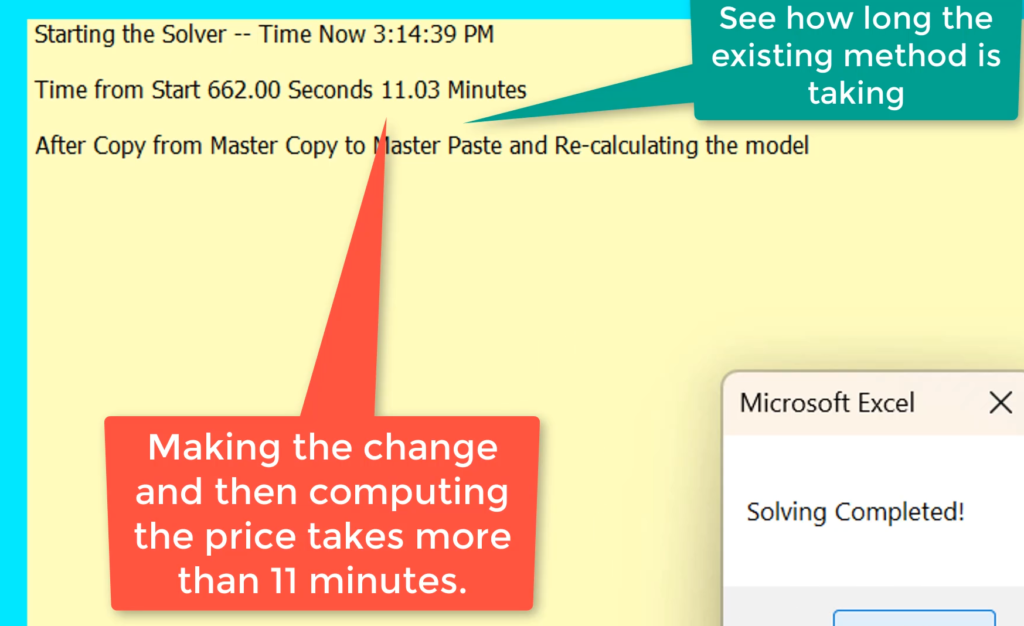
In the first case, the model is large (about 25 MB), with multiple debt issues and complicated tax equations. The copy and paste includes a goal seek. The screenshot below illustrates that running the copy and paste with the goal seek takes about 11 minutes. The method for adding timing to your models so you can evaluate timing is shown at the bottom of this page.
.
.
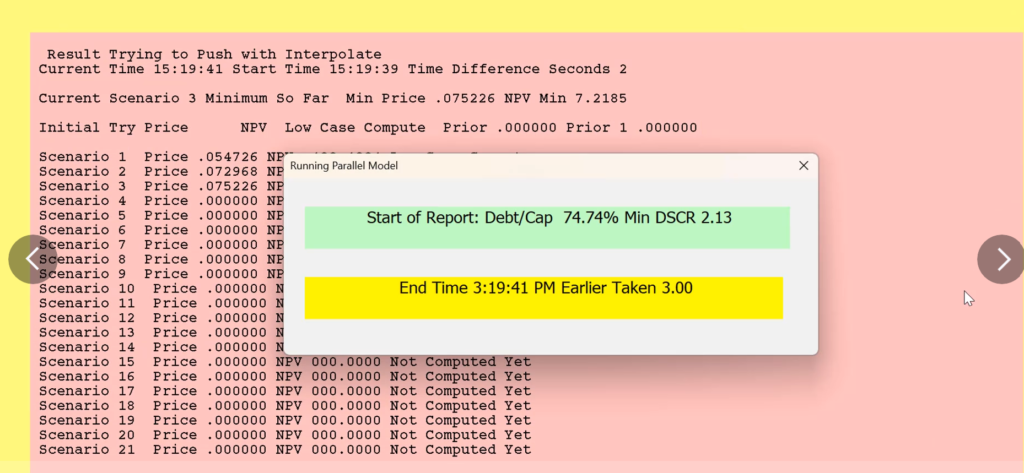
When the circular reference equations are transferred to code and the equations are wrote back out the excel file, the time it takes to finish the process, including the goal seek is reduced to only three sections. The dramatic time savings that we have illustrated before is shown in the screenshot below. This time of seconds includes reading data into a program (in this case VBA but if you a snob you can use python, HTML, C++ or whatever you want); doing the circular calculations and goal seek caclulations; and writing out data back to excel.
.
.
Case 2: A large model with reconciliation to actual data in the construction period and different generating units
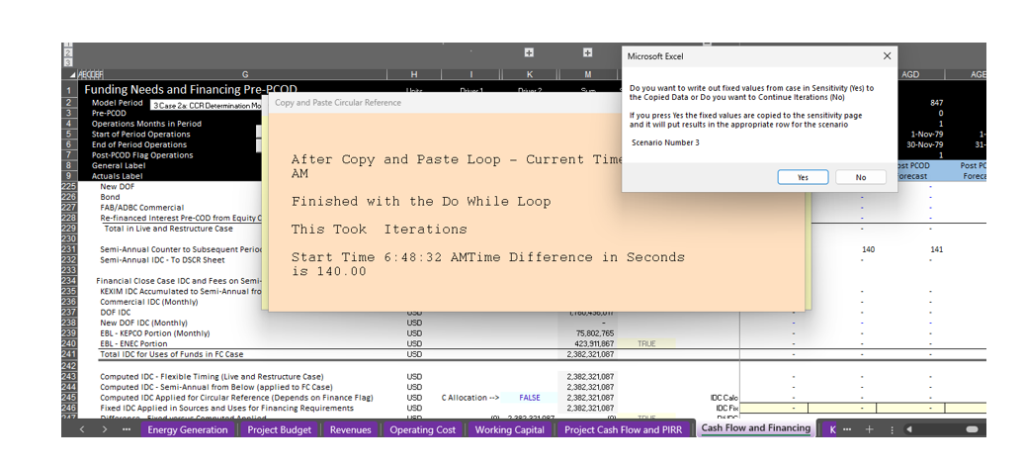
This case was the first really large model for which we tried to implement the UDF. This case had 10 different debt issues, a very long construction period, multiple different units, the option to allow dividends during the construction period and a detailed reconciliation of actual financing and actual interest costs with modelled costs through computing a gap.
.
.
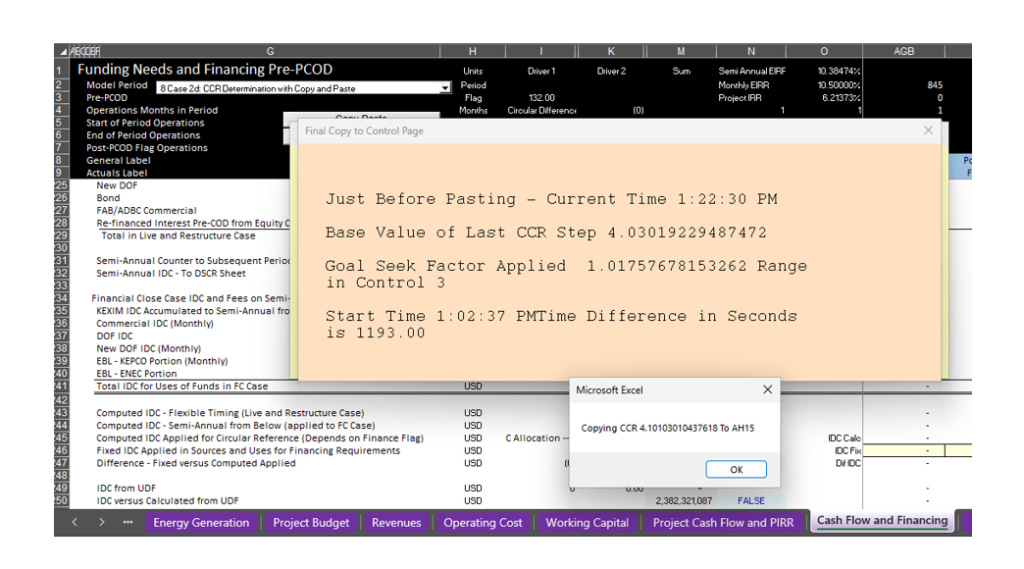
With the goalseek, the time greatly increases as shown below. In this case the time to run the copy and paste together with the goalseek was 1,193 seconds or a massive 19.8 minutes.
.
.
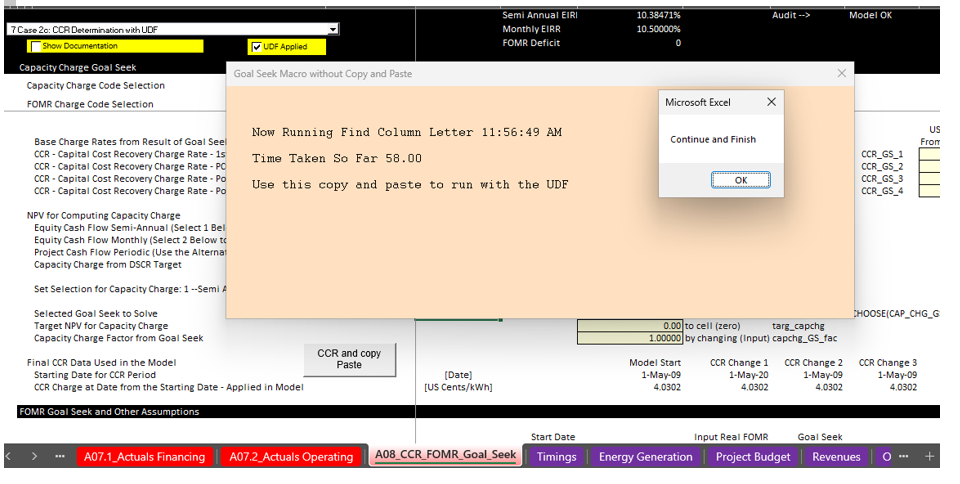
The resolution with a VBA program is shown below, in this case instead of taking 1,193 seconds, the process takes less than a minute. Please note that this was developed before we derived a method for including the goal seek as part of the process. In this case the goal seek was part of a macro and this macro used the UDF rather than the slow copy and paste process.
.
.
Case 3: A model that consolidates projects into a fund and becomes large with circular references
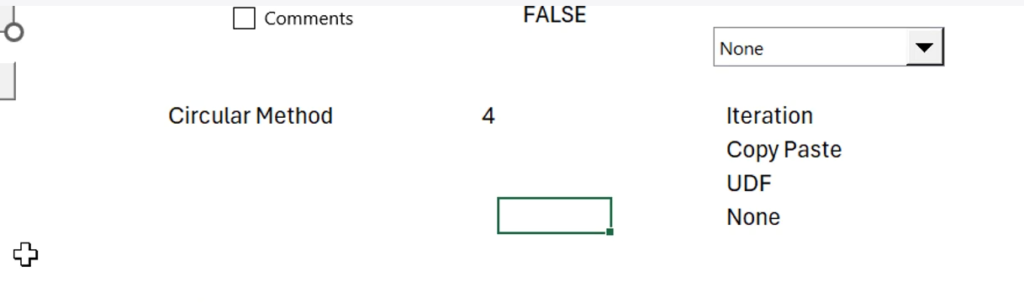
In this case, three methods were added to the hadle circular references during construction in different ways. To model the consolidation carefully, so that the different projects could have different construction start and inservice dates, the models should be monthly. To measure the time it takes to use different options. we have added options to use different ways to resolve the circular refences. The method labeled none cheats and does not make the calculations.
.
.
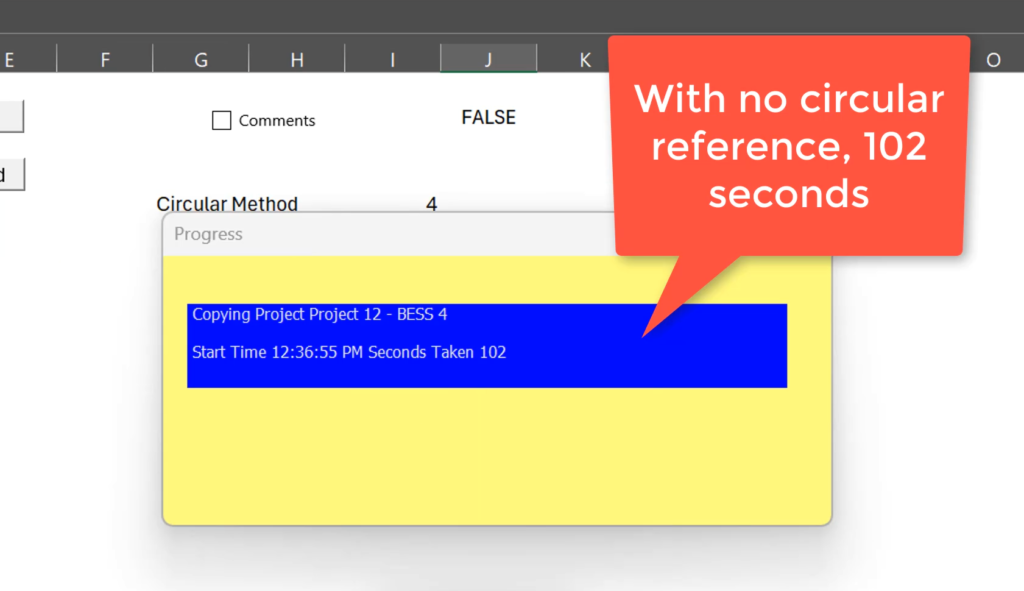
In this case a template model is copied multiple times and re-calculated using VBA code that changes inputs to the template model and the copies the template model to a new sheet. This takes a long time even if there is no circular reference. The illustrative case has a circular reference related to financing during construction. The 102 seconds is the benchmark to test the other methods for resolving the circular references. The time is more than a minute because the inputs to the template model are changed and then the template model is copied into a new sheet.
.
.
.
.
.
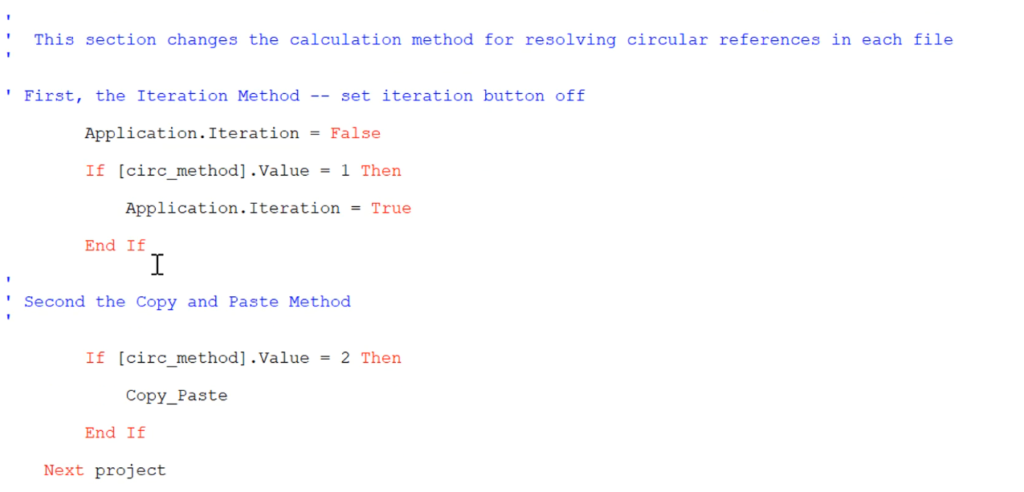
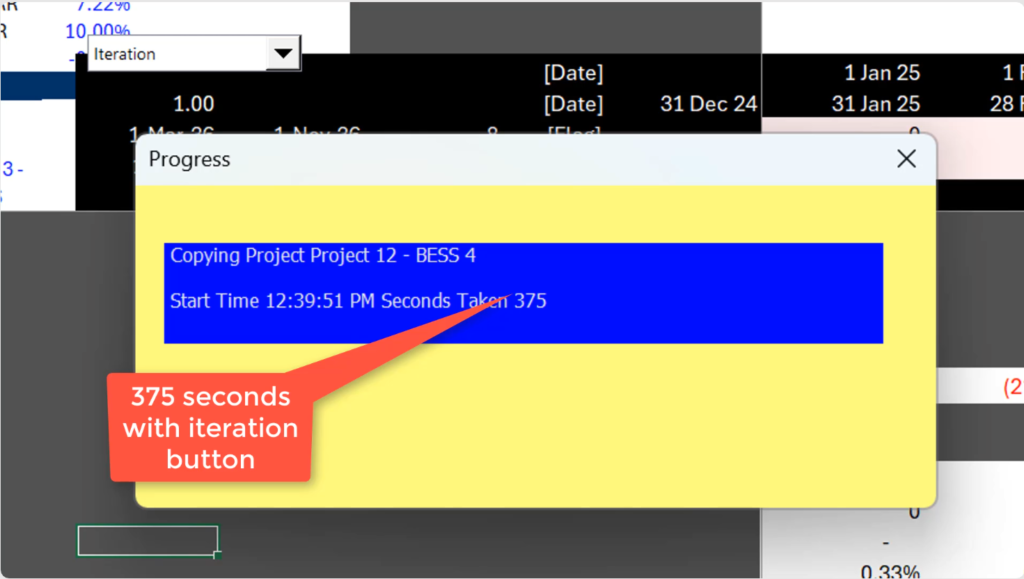
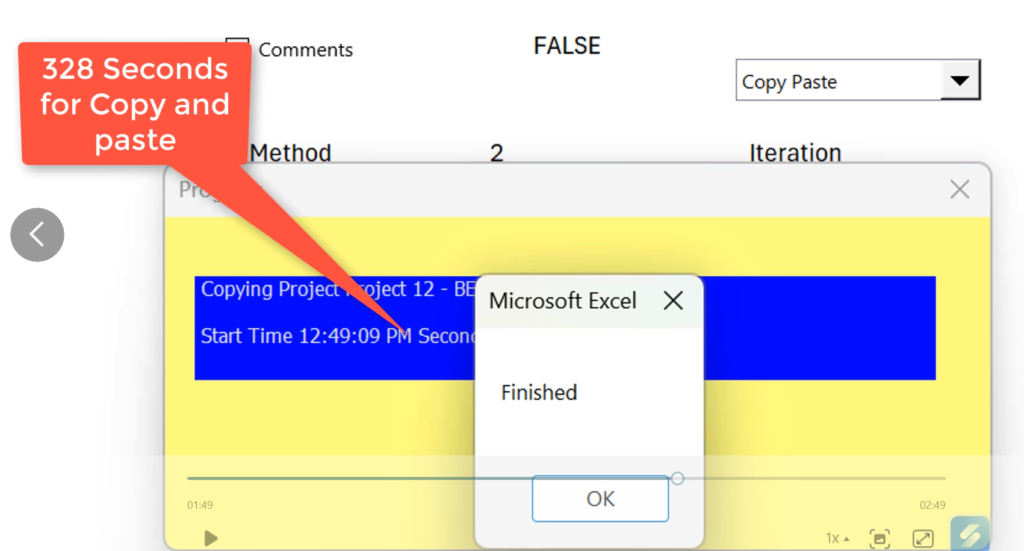
The third case is where the IDC is computed using the copy and paste method to resolve the circular reference. This increases the time to 328 seconds from the reference case of 102 seconds. It illustrates how the copy and paste increases the time. The two screenshots below illustrate this scenario. The first shows how you can change the circular approach to either the iteration method, the copy and paste method or the udf method.
.
.
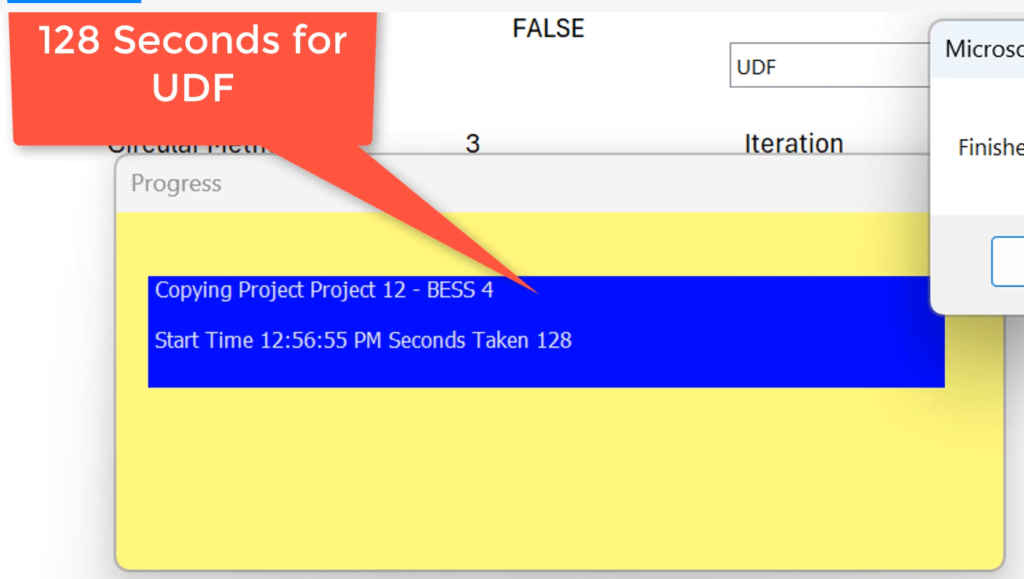
In the final case the UDF method is used. I this case time it takes is reduced back to 128 seconds, which is only a little more than the original case of 102 seconds. This is dramatically less time than the iteration method or the copy and paste method.
.
.
In this case, three methods were added to the hadle circular references during construction in different ways. To model the consolidation carefully, so that the different projects could have different construction start and inservice dates, the models should be monthly. To measure the time it takes to use different options. we have added options to use different ways to resolve the circular refences. The method labeled none cheats and does not make the calculations.
.
Case 4: Presentation of Scenarios with Parallel Model
The big advantage is that scenarios can be performed quickly. This is demonstrated with a case using a model with the fast modelling standard. You enter your own variables in a nicely structured InputC page as has become quite standard in the inustry. Below we disuss how you can still use your own scenarios and tools (rather than using a model built with HTML).
This model is available to download below.
.
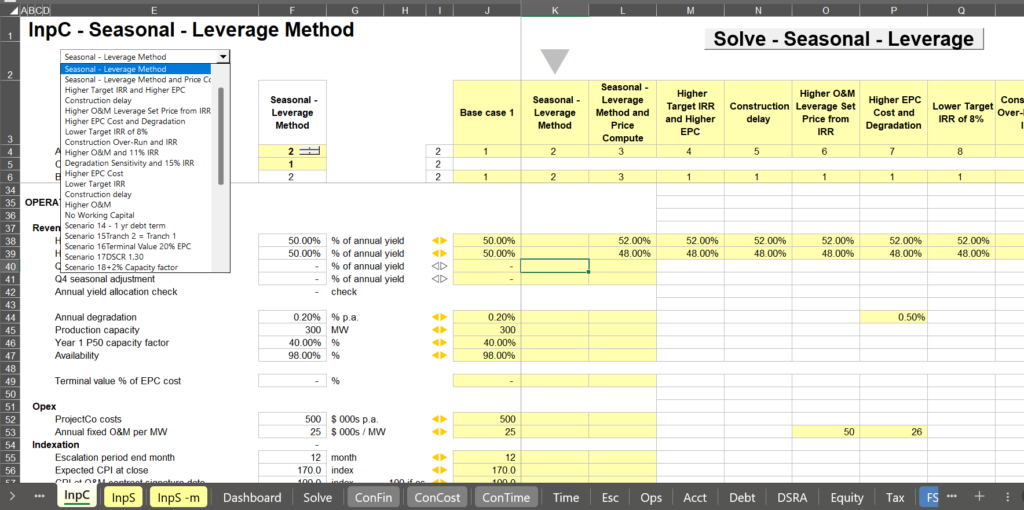
.
The second screenshot demonstrates how you can see the summary statistics with different scenarios. Note that in the selected scenario the debt to capital is used and the DSCR is output and the price is computed using a goal seek which is incorporated in the program using a bisectional method
.
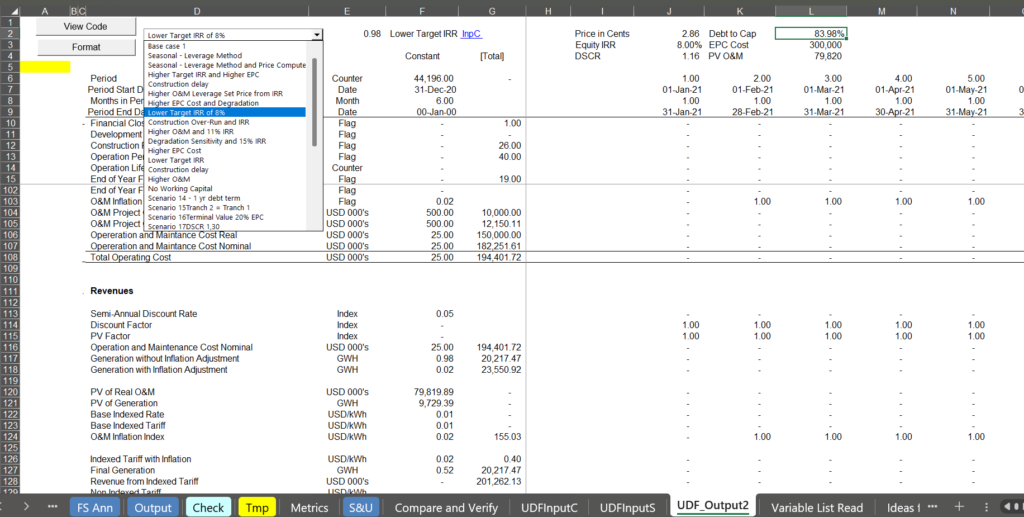
.
In the screenshot below, you can see how the parallel model can be very easily used with a dropdown box in the scenario page so that you can see the results in any format you want and you are not limited to some kind of HTML format.
.
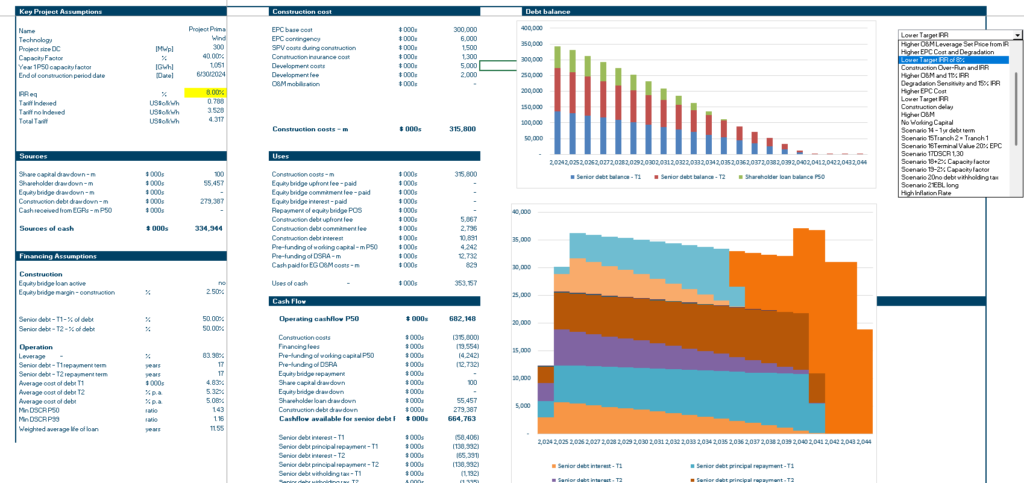
.
With that long introduction, the objective and the challenge are clear. To implement the process Hedieh and I have developed a few alternatives
Make sure that anybody can complete the process (with a little training) and do not charge a bunch of money for running the model.
Do not devolve into arrogance of using fancy terms or complex language (like saying that python is so much better than vba for the application) or saying that you have to complete the process outside of excel.
.
Open Source Philosophy
Hedieh and I understand that other are working on this idea and calling it some kind of shadow model (not our friend Rodrick McKinley). I think they are putting this in other languages and then into HTML. Companies that build large models and charge a lot of money for the models have been studying the problem and trying to use AI to create what they call shadow models to reduce the enormously long processing time. Our goal is to show you how to do this yourself so that you can make presentations in important meetings without delving into tricky programming issues. The large firms are developing the method but not providing this to clients.
Hedieh and I have been putting our models and explaining our models into the public on our websites and discussing the files in videos for many years. We believe if you cannot add the techniques to the models yourself, they are worthless blackboxes. That is why we are putting things here.
The big challenge is not to understand that replicating an excel model with a program (whether VBA, python or HTML). For Hedieh and me, the big challenge is to make the process realistic and usable in a reasonable amount of time. We have been working on methods to accomplish this and we believe that AI can be effectively used to do this. The three methods below can, we believe accomplish this so that you can add the method to your model in a couple of hours.
In line with the idea of making the method into open source is that you can understand the method and exactly how the method works. In working with companies that make the large files, we found people to be impatient and wanting to learn how do implement the program with a few phone calls. Hedideh and I believe the problem is important enough so that you should make an investment in seeing how this works. We are offering an on-line master class so you can see how the process works. We belive that this will have many benefits.
.
We Are Not Trying to Make with Models that Have Inconsistent Structured Time Lines and Badly Structured Input Sheets
.
In working with the large modelling companies, there were some calculation sheets that developed formulas during the construction period on a monthly basis and other sheets that during the same construction period had semi-annual flows. For computing taxes, the timing was inconsistent. I was able to manage these issues, but they were painful. Hedieh suggested that in making the models the timelines — whether monthly to semi-annual, whether monthly to quarterly, whether all monthly should be consistent. This means there can be monthly in construction to semi-annual in the operating period, but not inconsistent timelines for the same period.
In terms of structuring the inputs, the InputC works best without &,-,@,! symbols although this can be adjusted. We have structured the skeleton models to work with one InputC with non-debt inputs, one InputS sheet with the detailed time line and one InputD sheet for multiple debt issues.
.
Using AI in Simple Circular Case
Many years ago Hedieh and I demonstrated how you can resolve circular references in simple cases where there are not many variables that cause the circular reference and there are only one or two circular reference items. When we demonstrated this, you had to read in variables to the UDF separately (like reading in the discount rate and the cash flow to the NPV formula). Further, you could only get one circular reference item out of the process such as the amount of the debt. As explained by our friend Rodrick,this kind of circular reference process can be resolved with AI. You do not have to do any programming. But you do have to understand how a UDF works and you do have to copy the VBA created by AI into a module.
Our friend (we have never met), Rodrik McKinley effectively demonstrated that you can ask AI to make a program and then inport the program to a UDF to locate the items that cause the circular reference. We apppreciate the comments he made and his demonstration (a link to his video is below). But we have found over the years problems with the way AI did the job. These problems included:
- When circular references get complicated there will be problems reading in separate variables for capital expenditures, interest rates, tax rates, debt terms, price and quantity for computing price and many items. You can try to abbreviate things but you will end up hitting the horrible limit of 168 characters and it will be painful to enter all of the variables or used fixed row numbers for inputs.
- When you begin writing the code, the variable names will not be easy to read and you cannot separate the variables in different simple little programs that will closley resemble your sheet (you can resolve this with careful revised prompts and/or defining skills).
- The manner in which AI will create and iteration loop may be difficult to manange when some parts of the model do not cause a circular reference.
- You want to have flexiblity in printing out items from the calculation and do this in a flexible manner
Here is a link to Roderik’s video demonstration use of AI to resolve the difficulties in creating a program
.
Simple Model to Test how AI Creates Code
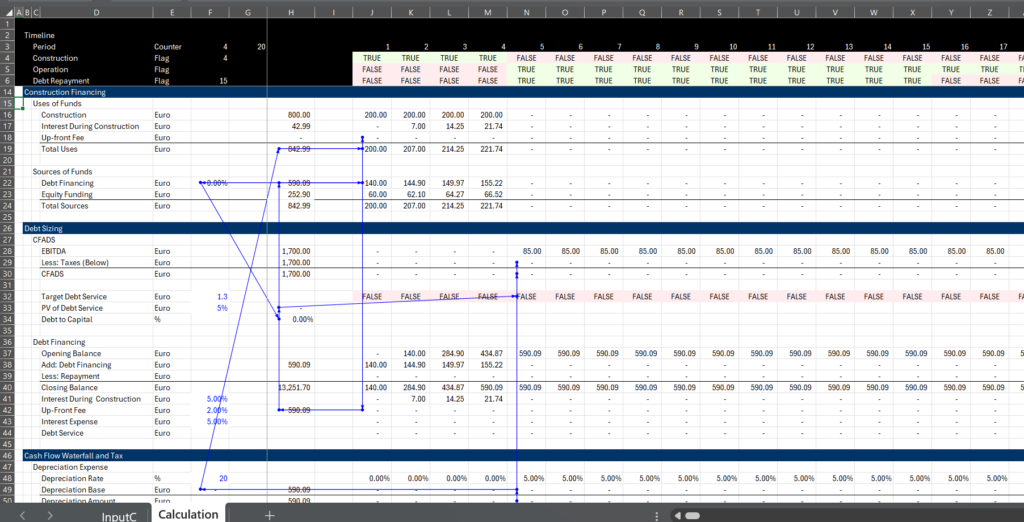
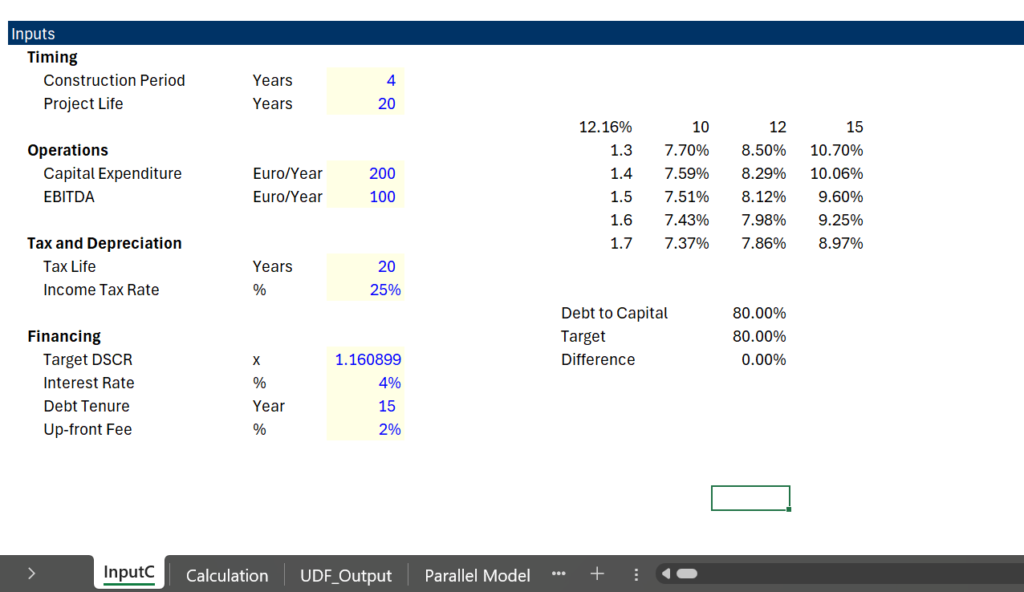
The process of usng AI to create a simple circular reference resolution is illustrated by the simple example below. In this example there is an up-front fee and interest during construction. The debt is sized with CFADS that depends on taxes. The model is annual and only EBITDA, depreciation, capital expenditures, tax rate and a few debt parameters are used. The financing during construction is pro-rata and the target DSCR defines the debt size. The model is illustrated in the screenshot below. The inputs and the circular reference are shown in the two screenshots below (the inputs first and then the simple model). The button is attached to the model with no resolution of circular refereces so you can test the model using AI.
.
Simple Model with Circular References in Construction Period and in Operation Period for Testing AI
.
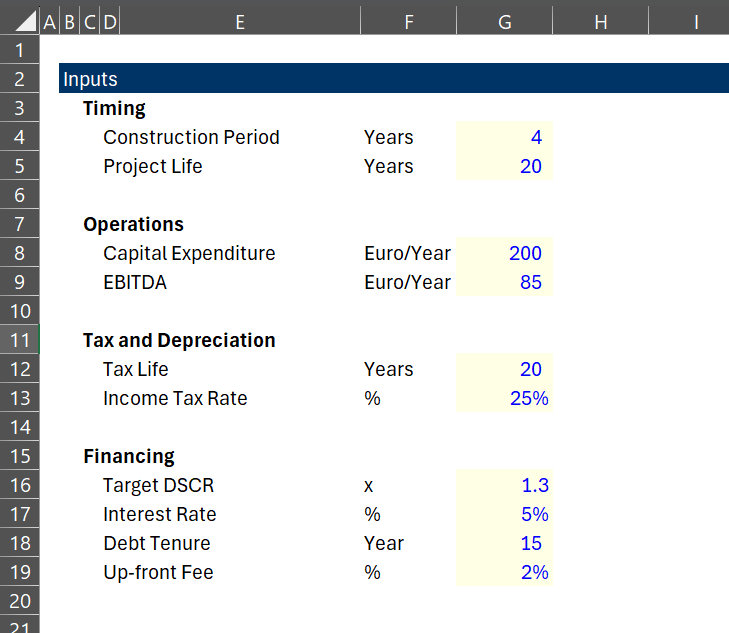
.
.
.
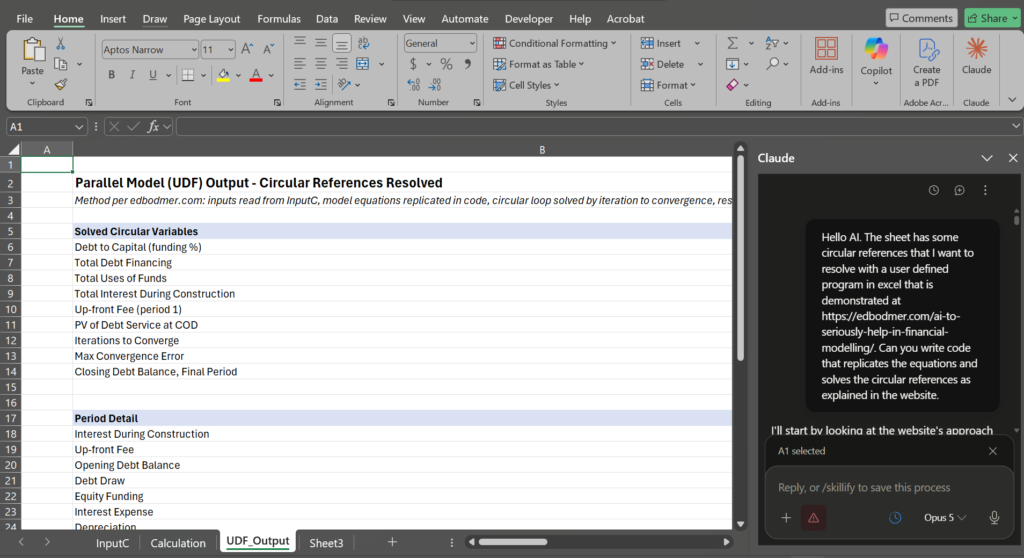
After watching the video the Rodrick made, and seeing what Hedieh did, I thought I would try to just ask AI to construct equations so that you wouldn’t have to do anything and you could have AI do all of the programming. This would be the thing Hedieh and I are looking for. We know that the general idea of taking inputs from a model and putting them into a program followed by writing out the key inputs works well. We have known this for many years. Our problem has been making it easy for people who have not wasted their life making programs. So I began with the prompt repeated below and shown on the screenshot.
.
Hello AI. The sheet has some circular references that I want to resolve with a user defined program in excel that is demonstrated at https://edbodmer.com/ai-to-seriously-help-in-financial-modelling/. Can you write code that replicates the equations and solves the circular references as explained in the website.
.
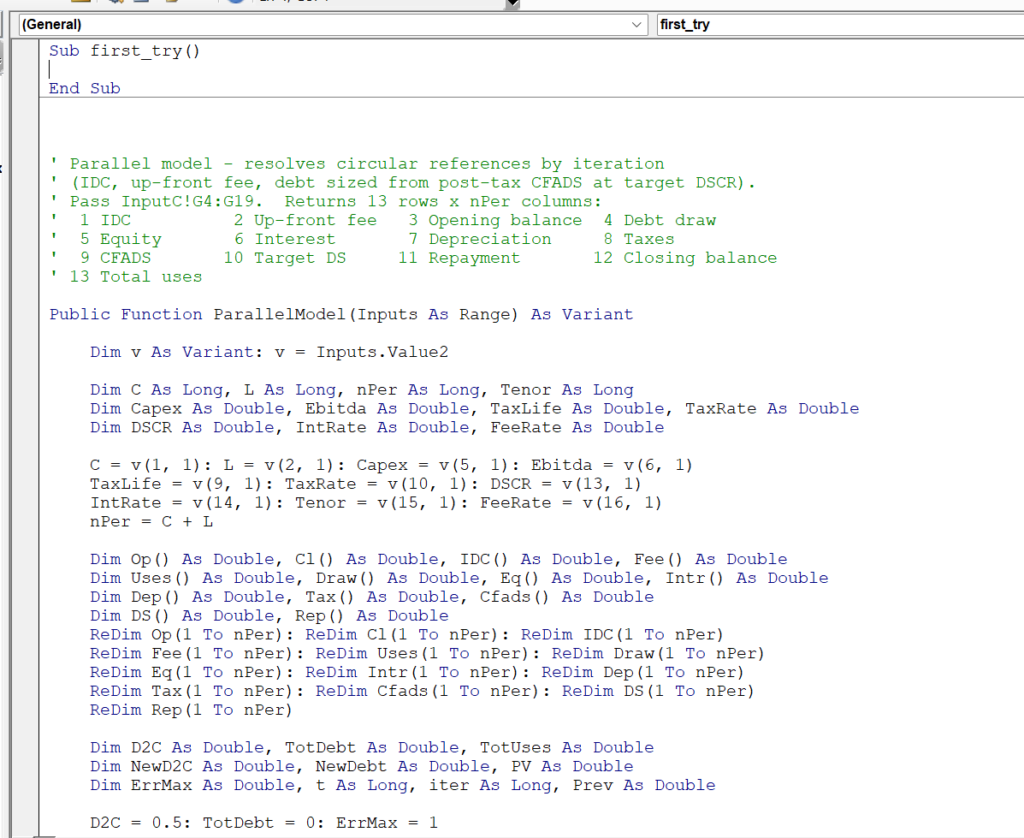
AI put in a sheet called UDF_Output like I normally do and it put in values that solved the circular references. It also put the links to the other sheet in greeen like Americans do with the red blue green style that I do not like (I use colours that I steal from other international models). It found that if you find values for debt to capital, IDC and fees, the circular references will be resolved. The interesting thing that AI did is to write a function that you can put into your model. To do this you have to go to the back area on the right, find the function that is written and copy it to a model. After you copy (Alt F11 and then insert a module and then put in a blank macro so you can find the function) it you can see a little how the function works. In this case a function was created that reads a single column from the input page and then writes out some key inputs (this is pretty good and is better than an earlier try where AI read individual cells). An excerpt from the VBA code from this intial try is shown in the screenshot with my little sub. This shows that AI is good at two things at least. First, it can translate excel equations into code. Second it can look at the website and copy the method.
.
.
.
.
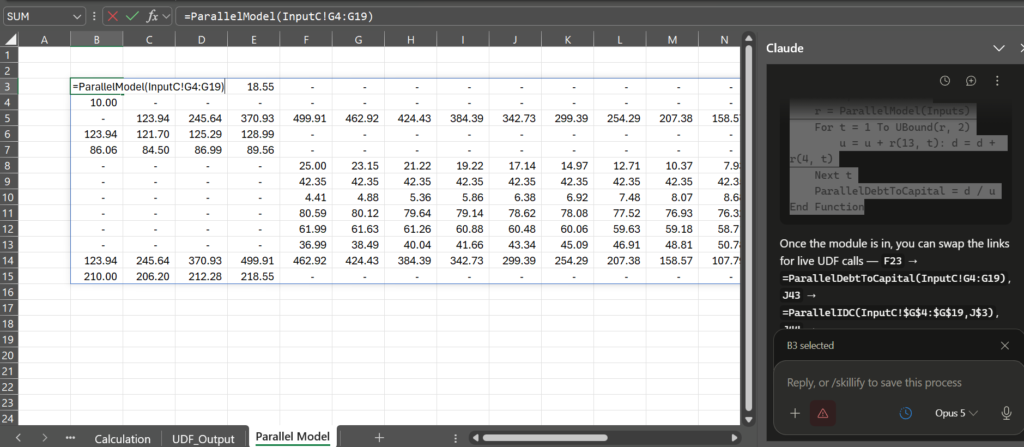
When you look at how AI wrote the code, you have do a little interpretation. It has named the function ParallelModel the way Heidieh and I have done it. It isl looking accross one column (e.g. TaxLife(9,1)) and if you look down there is a variable called R that writes out the code. You can then enter the function ParallelModel(Input One Column from Input Page) into your model and it will produce the results. The manner by which you can enter the UDF is shown in the screenshot below.
.
.
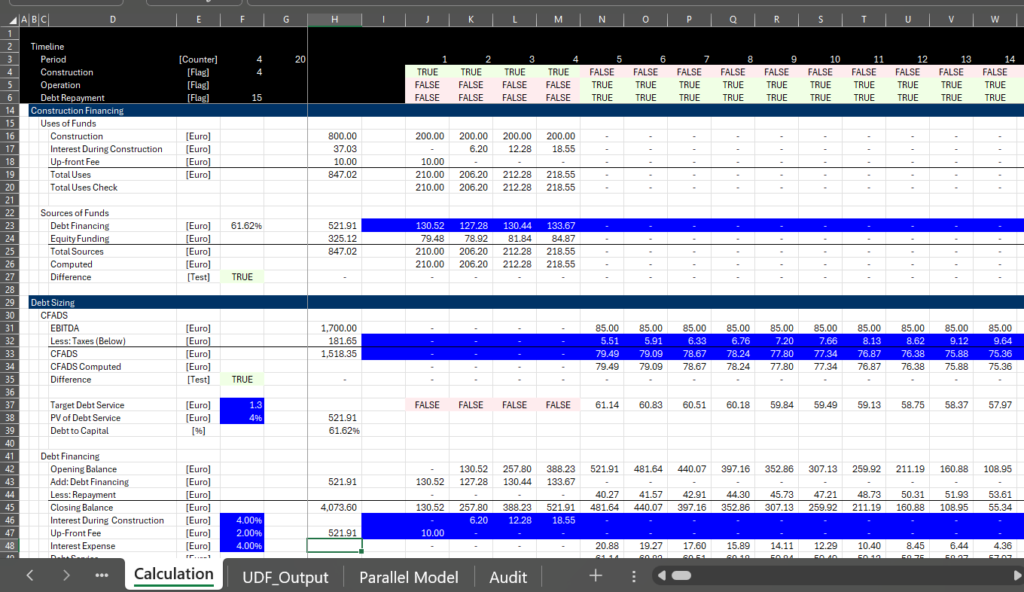
The next step is to connect the output variables to the model. If you look at the output carefully, you can see that the output does not include the green fixed cells that AI made which includes variables in the sources and uses of funds and in CFADS. The variables you really need if you have worked with models are three. First the debt to capital; second the total funding needs or the total sources; and third, the CFADS. Hedieh taught me this. Despite this I linked the debt financing and the CFADS, the IDC and the Fees and the taxes (I got the taxes wrong at first). I also took away the green variables that AI fixed like debt to capital. I used the reverse colouring in generic macros so you can clearly see the linked variables.
.
.
Now with the correct links and the parallel model installed, we can see if it works. I make a test with a goal seek and a data table. I also put in tests below the toal uses of funds and the CFADS to assure that the model is working. You can of course put this into an audit page (the two tests above). The screenshot below demonstrates that the objective is met. Both the data table and the goal seek work now and if there was a speed test (which is not worth it), the speed would be fast. The file with the results of this is attached to the button below the screenshot.
.
.
.
Cleaning Up AI Code and Remaining Problems
This was really not bad and for models with simple circular references it can be ok. I have comments on much of the style of programming which can be easily fixed and I demonstrate below. But for advanced models that you want to change and for including added circular references, I think there are problems. These problems can be expressed using the FAST standards (I change the A from appropriate to accurate). As I have written many times elsewhere, the way the FAST standards are actually aplied in a buretratic manner by companies that make model with repetative equations makes me vomit. Here are my comments about the AI code above as it relates to FAST.
Flexible – The AI code is not flexible if you add inputs and add equations. Just inserting a line in the input sheet would require the whole code to be changed. If you want the model to compute a tariff in the AI code, you would have to re-write the code. If you added VAT you would have to re-do the whole thing. You also probably what to have the ability to output different things.
Accurate – While I added tests in the model, there could be a whole lot more tests and you may want to compare the parallel model to the output you get with copy and paste.
Structured – In a large model with many sheets and different debt sizing methods you will want to see parts of the code in a similar structure as the model sheets. The manner in which model called functions was confusing and not structured.
Transparent – The code was not very transparent and could be dificult to interpret. The output did not have titles, The variable names were invented by AI instead of corresponding to the names in the model. The redim functions were a mess.
.
Revised Prompts
Some of the probelms with transparency can be resolved with added prompts. Much of this is style and you may disagree. But you can see what can be easily improved and what cannot. The prompts I used are below (I was less polite with AI this time).
I did not like you style in certain respects. First can you use option base 1 and not complain because it is easier to read. Second can you just make all of the variables with a dimension have 1000 and not bother with all of the redim statements that make the program difficult to read. Third, can you redo the variable names to make them consistent with the titles in the model (for example Income_Tax_Rate. Fourth, can you put debt to capital, total uses and CFADS at the top of the output array as these are the variables in the model which will be replaced. Fifth, could you name the R variable for output and OUTPUT. Fifth, could you change all of the variable definitions to Public instead of Dim the model can have different modules. Sixth, could you put the code into one function rather than the confusing way you called the different functions. Seventh, could you not complain and just give me code with a better style.
AI then told me that they used -1 for true which pissed me off. Here is what AI told me.
Two mechanical points on using it: the flags are multiplied by -1 because VBA True is -1, which keeps the capex and EBITDA lines positive; and since OUTPUT is fixed at 1000 columns, enter the formula over exactly 15 rows × 24 columns with Ctrl+Shift+Enter so Excel takes only the used block.
Here is my added prompt
The idea of multiplying by -1 is silly and makes the code different from excel. Use 1 for true as in any reasonable program.
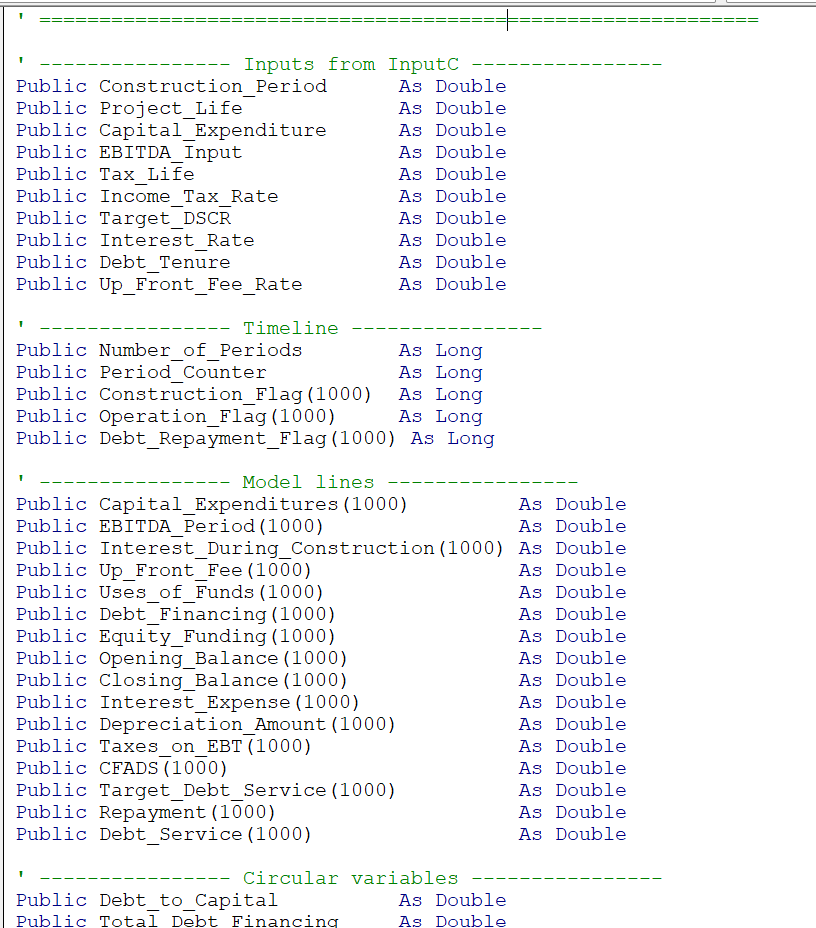
After asking for these revisions and using AltF11 to copy the code into a new program, the style was so much better. First, the public variables. By defining the public variables you can put them into a different module and work with a nice big list. Maybe it is like keeping track of people’s name in a class or some kind of inventory list. You may want to adjust the names later and with a clear place to do it, it will be much easier. For this, I say nice jobAI. But I would not tell AI this.
.
.
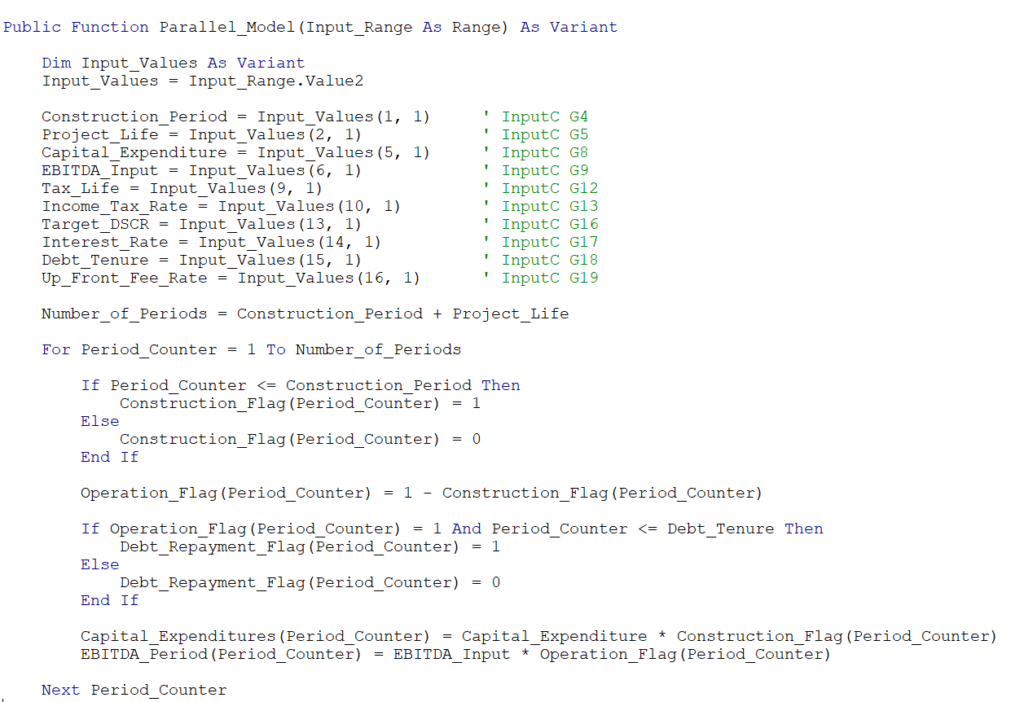
In the function, the inputs are still rigid, but you should be able to understand the results as illustrated in the first part of the program.
.
AI made a convergence loop and tested for convergence. ere a few snapshots of the results. I made two screenshots below to illustrate the way it is done, which is reasonable.
.
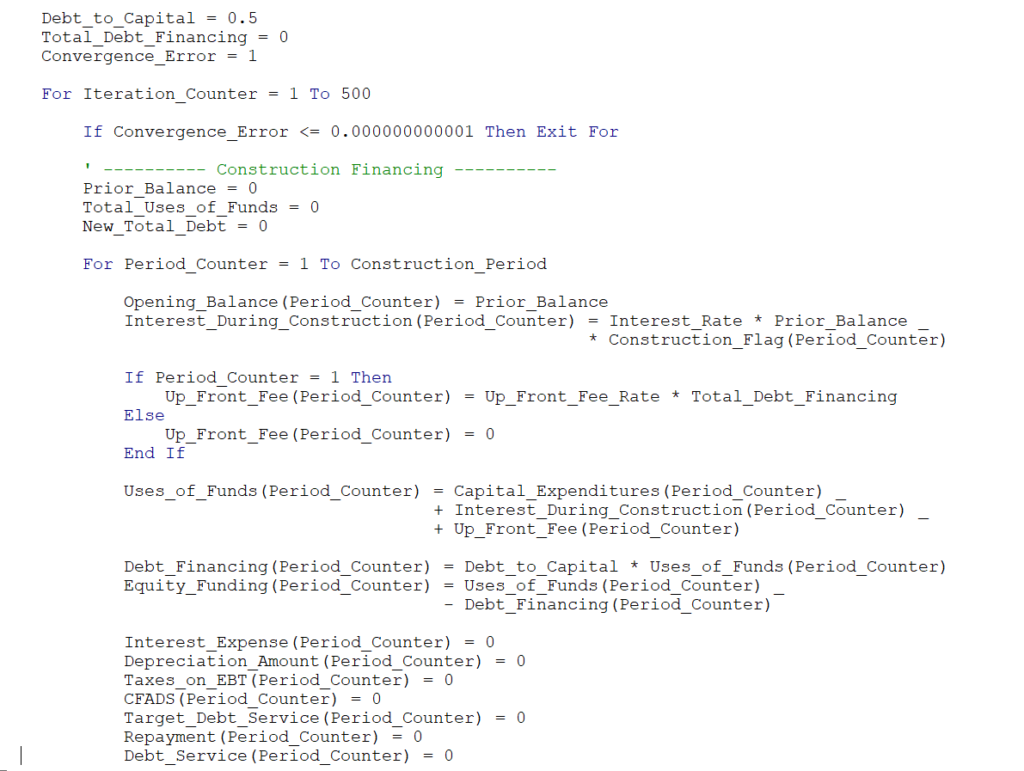
.
Here is the end with convergence based on debt to capital.
.
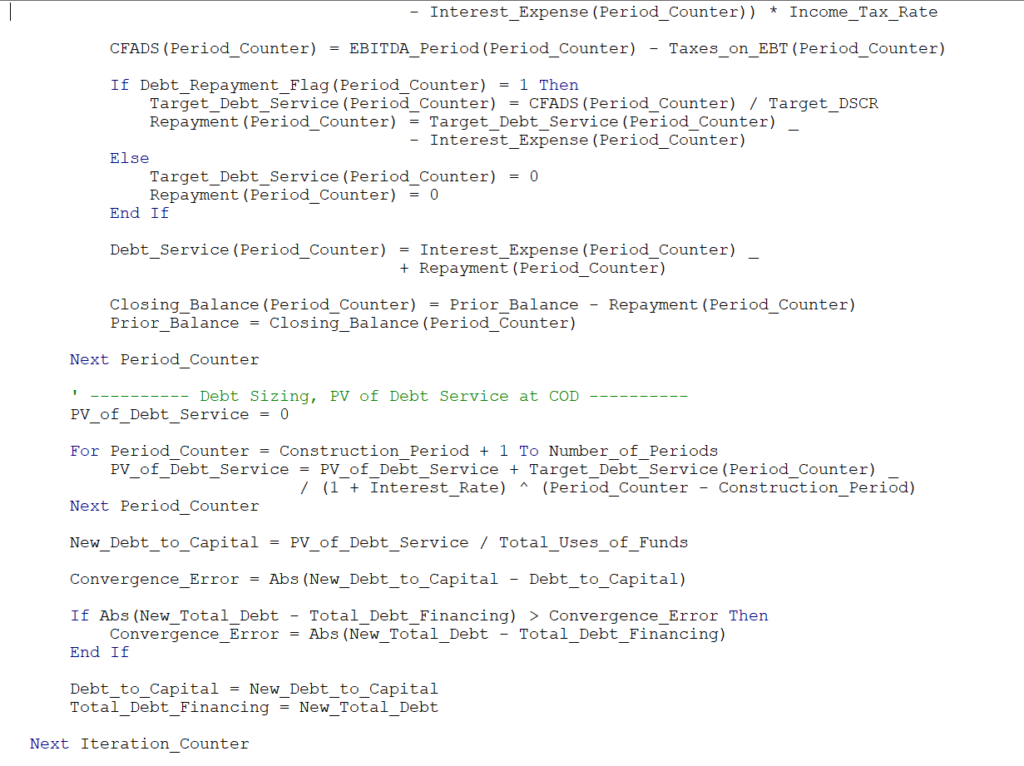
.
The final part of the code writes the ouptut. This could be much more flexible with a method Hedieh has created to make flexible reports. But at least you can see how it works.
.
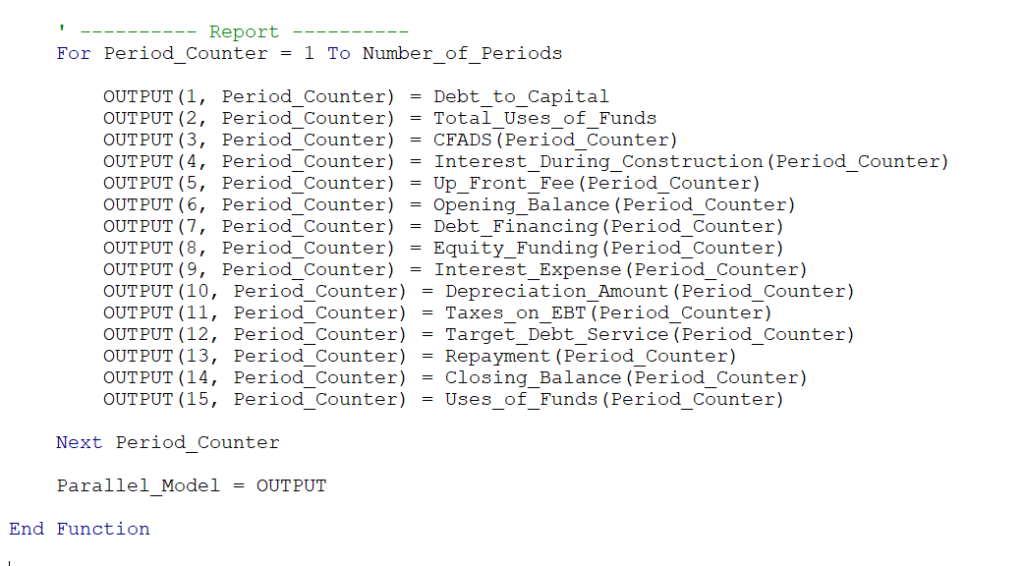
.
Now you can use the parallel_model function and read the inputs. This time I used the comments given at the top of the function that define the outputs. Not great but not bad.
.
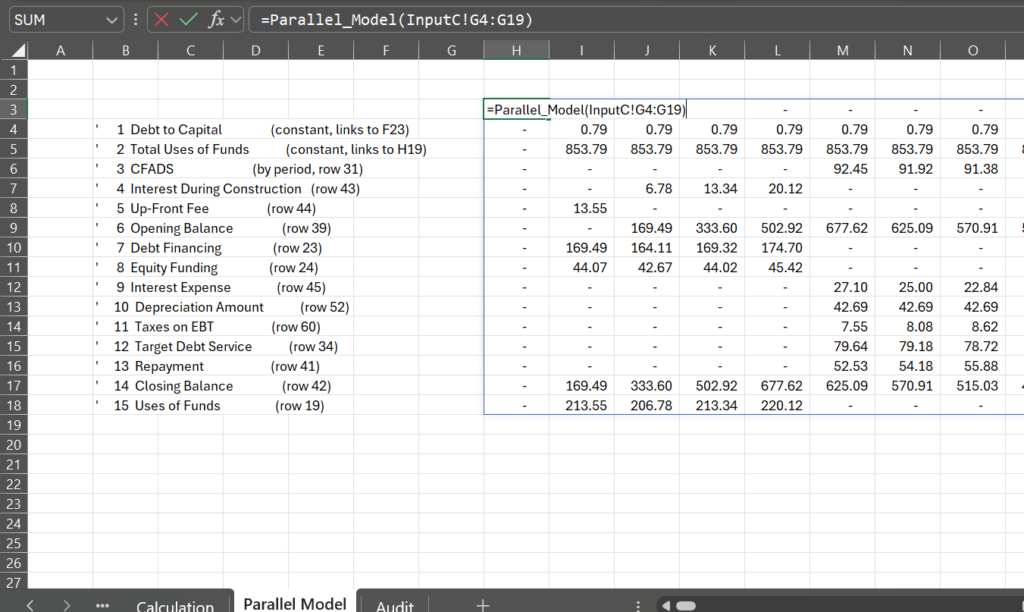
.
The model only requires three references from the output. First, the debt to capital, second the total uses and third the CFADS, The rest you can let calculate and you can verify these three calculations against the independent calculations.
.
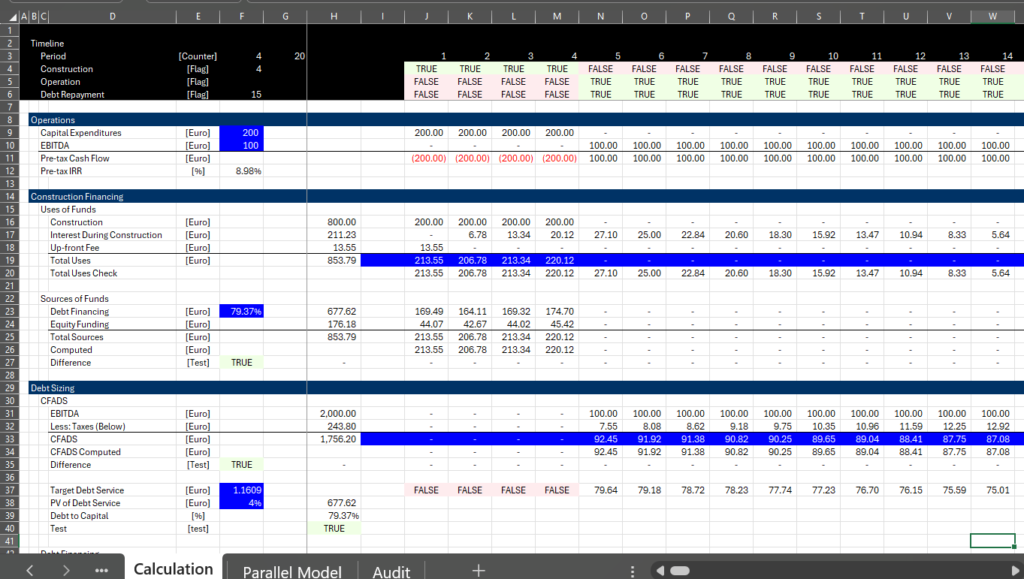
.
Finally, the goal seek and the data table stll work.
.
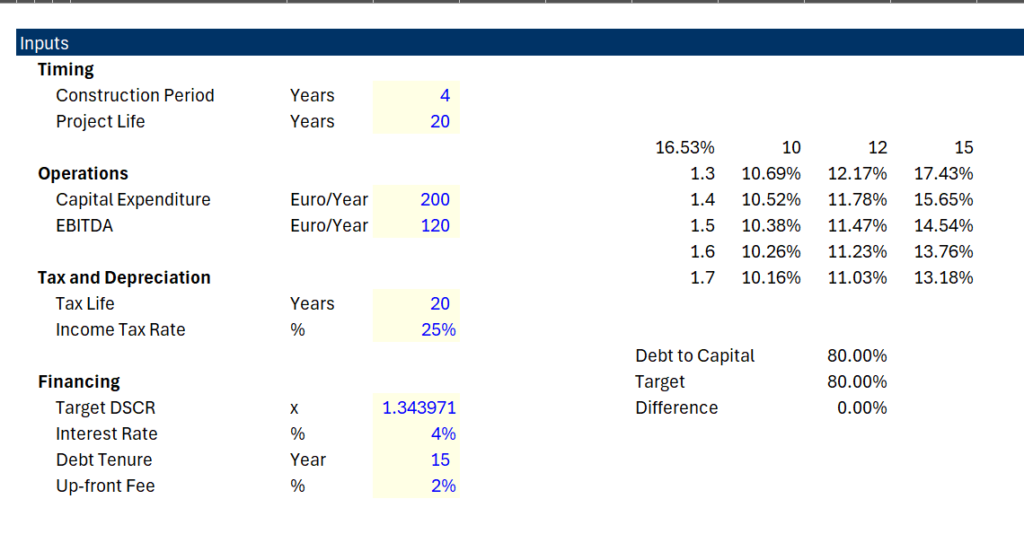
.
The file that has the code is attached to the button below.
.
.
Files to Resolve Circular Reference
I have included two files below associated with this page. The first file was the last effort I made in applying a UDF to resolve circular references. This file reads all of the data from InputC and from InputS. After the variables are read, they are converted to variables that are used in the UDF. I have automated this process with AI. With the variables that are read in, the various calculations are made. This calculation section can be replicated and/or guided by AI and it uses a common loop around periods for the time line. Once the calculation modules are established, a loop is put around the calculations that have circular references. In the ciruclar reference routines, a bisectional program replicates the goal seek functions in excel. Finally, a report section of the UDF puts the results with circular references resolved back into excel. I am not replicating the routines here. The model is the basis for seeing how we can make things easier with AI. The file is attached to the button below.
Implementing a program in the model is illustrated in the screenshot below. The dropdown list contains many different scenarios from the InputC page. Some of the scenarios include a goal seek and others do not. The equity IRR has been verified by using the copy and paste routine and comparing it to the UDF results. When flipping around scenarios the time to compute a scenario is minimal, including the cases where the goal seek is used.
.
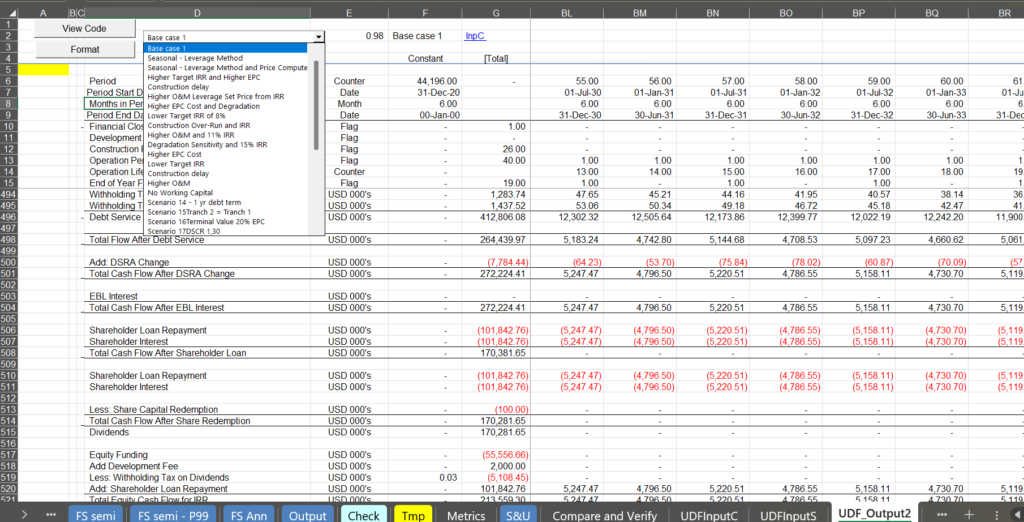
.
Solar Model Used with FAST Modelling Standards that Includes Resolution of Circular References
.
The file attached to the button below can be opened by Claude or Kimi to guide the struture of programs that can effiently read variables into a program (VBA or something else), and then to create variables in to make calculation subroutines. The model also includes a guide for how to struture the programs by yourself. The first file has the pure skeleton with blanks. The second button has the
.
Parallel Model Creator Skelton to Use as a Base for Copying Code in Your Financial Model
.
Skeleton Approach Combining AI and Better Code
Our friend (we have never met), Rodrik McKinley effectively demonstrated that you can ask AI to make a program and then inport the program to a UDF to locate the items that cause the circular reference. We apppreciate the comments he made and his demonstration (a link to his video is below). But we have found over the years problems with relatively simple way that AI did the job (reading in separate variables, not using public data, no goal seek, no flexible reports, difficulty in managing multiple debt issuss). These problems included:
- When circular references get complicated there will be problems reading in separate variables for capital expenditures, interest rates, tax rates, debt terms, price and quantity for computing price and many items. You can try to abbreviate things but you will end up hitting the horrible limit of 168 characters and it will be painful to enter all of the variables.
- When you begin writing the code, the variable names will not be easy to read and you cannot separate the variables in different simple little programs that will closley resemble your sheet.
- The manner in which AI will create and iteration loop may be difficult to manange
- AI can create a program for computing goal seek and you will probably have to adjust things to get it in your model and use it so that some cases can use the goal seek for settng price and other things while other cases do not.
- You want to have flexiblity in printing out items from the calculation and do this in a flexible manner
You do not have to be a programmer – you can use a skeleton template and AI
Hedieh has developed a method where you can copy some stuff from excel to some generic VBA code. The code you copy is adjusted from the financial model equations and inputs but the initial steps to read the model output and some generic formulas for writing out the results. The process involves copying a list of public variables defined in excel from the inputs and non-circular reference items in the financial model. Second, the variables that need to be read from the excel model that are automatically defined by in the excel file can be copied. Third, some of the circular reference equations such as computing the interest expense as a function of debt are copied. For this section you can use templates and/or write your own equations and/or let AI help with the equations. Fourth, you can create your own customized report structure which will be translated into code that can be copied into VBA code. The files, the screenshots and the videos below illustrate this method with a simple case and a difficult case. The simple case just has circular references associated with interest during construction, up-front fees, and debt sculpting with taxes. The complex case includes multiple debt issues, tax effects of shareholder debt and incorporating a goal seek.
Do do this I use a workbook that has the structure of a model with a skeleton of functions for creating a parallel model. The following is going through the steps on a step by step basis. For this we have created two workbooks. One is a workbook with the skeleton code and sheet structure. The other is your sheet. At this point there are a couple of things about your model structure (we may change this later).
Hedieh and I discussed how to set-up a model and whether we should put everything in one page. We have included many pages that you could hide later. This means you will copy a block and use macros to create the first pages so that
When using this approach, Hedieh and I have tried to make it similar to the way AI asks you to insert code. Unfortunately there are a few more steps than simply inserting one line of code that you don’t understand as in the screenshot below which I used for this website (it did not work by the way)
Finally, in setting this up, we have included a lot of different pages to make the process more transparent. This idea of many sheets can be revised.
The idea of setting up a skeleton with code that is written from information in your model and then copying this code to your model is analagous to situations when AI asks you to insert code.
.
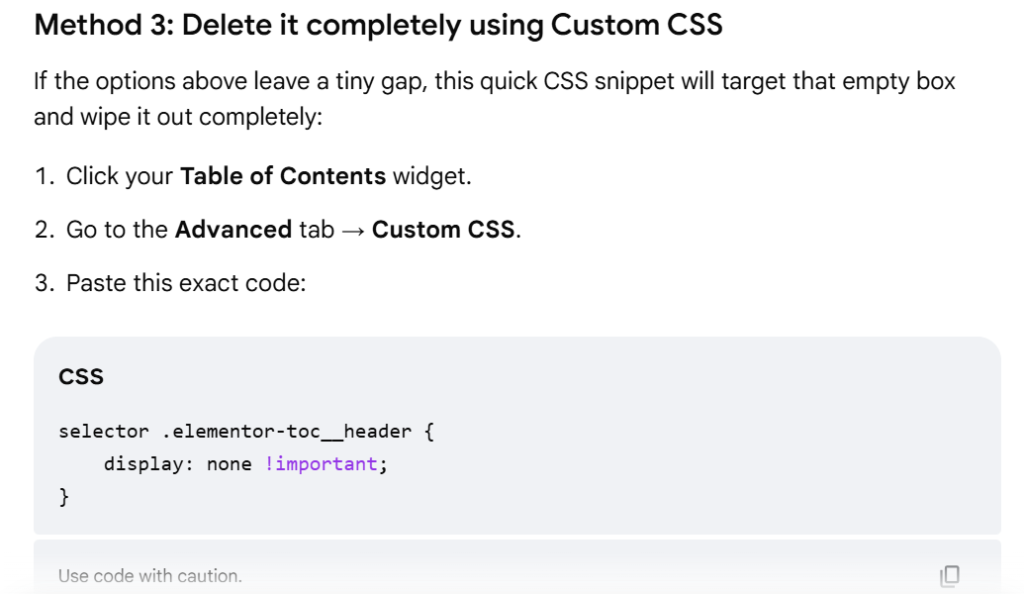
.
Step by Step for Skeleton Method
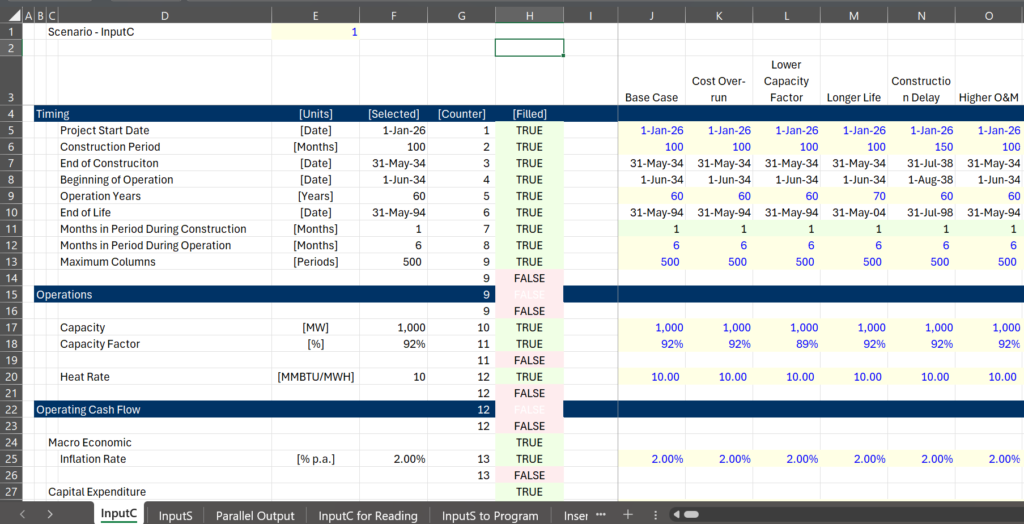
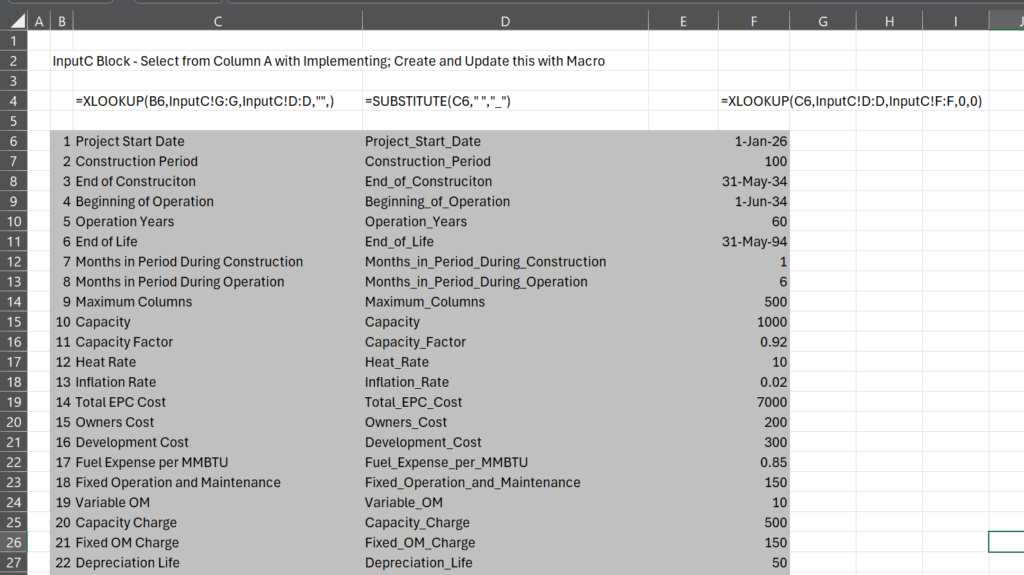
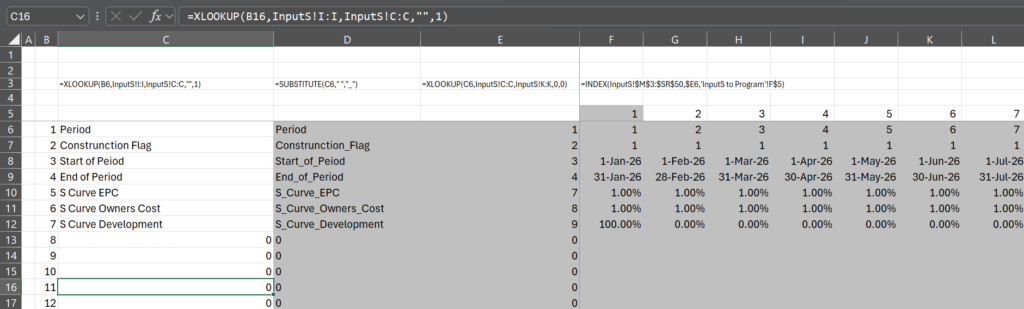
Step 1: Add a sheets to your model and open the file named Parallel Model Creator.xlsm file from the button above. To do this you shoud assure titles in the InputC are in the same column and add two columns that count the number of inputs that will be transferred. This avoids the slow process in AI for copying a sheet and makes the model flexible so that you can add new inputs into your model. The formulas to be added to the InputC and the InputS are illustrated in the screenshots below.
Important, for now do not put any dashes in things like up-front fee or pro-rata (we can make a macro that removes the things that any computer language does not like in variables).
.
.
Step 2: Copy the Sheets Named …. You can also use the Parallel Model Creator, which will create blank sheets. You can use AI to insert the functions from the skeleton model.
.
.
.
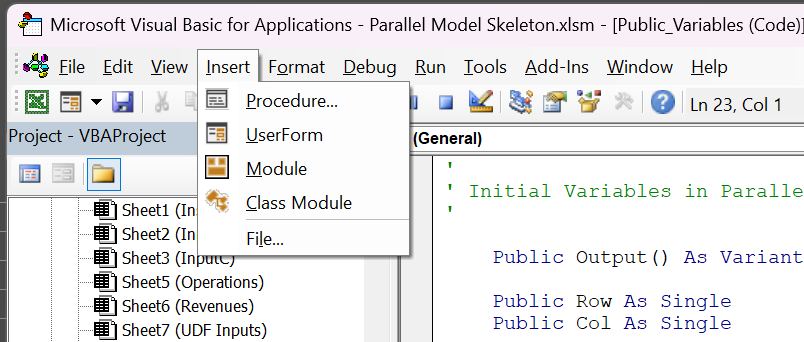
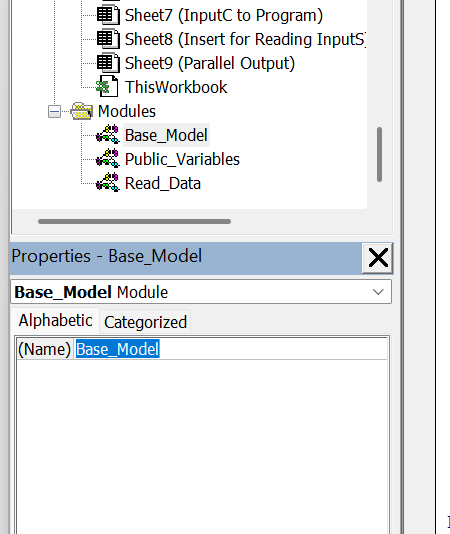
Step 3: Open the VBA page and insert five modules. You can then re-name the modules using the F4 key. This is illustrated in the two screenshots below.
.
The screenshot below illustrates how to change the name of the module after you have inserted the module. Then name is hilighted because the F4 key is pressed.
.
.
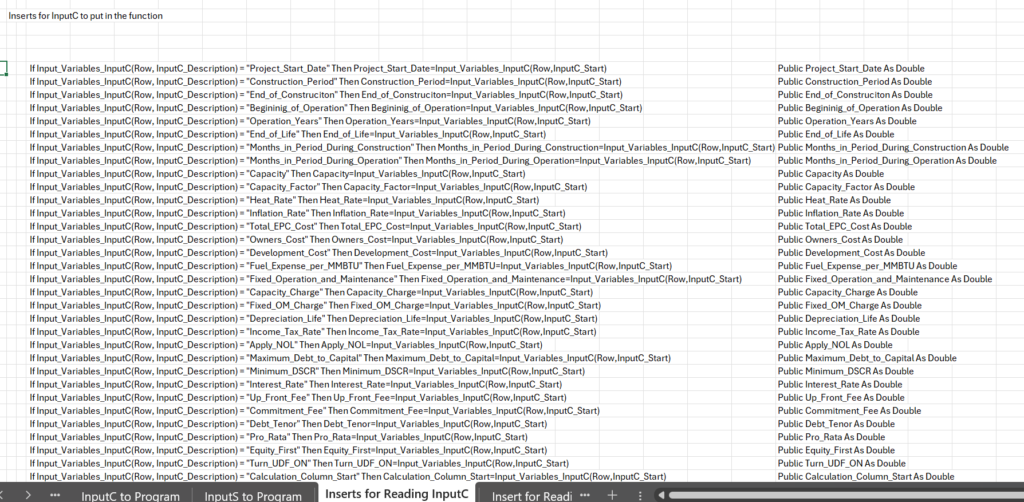
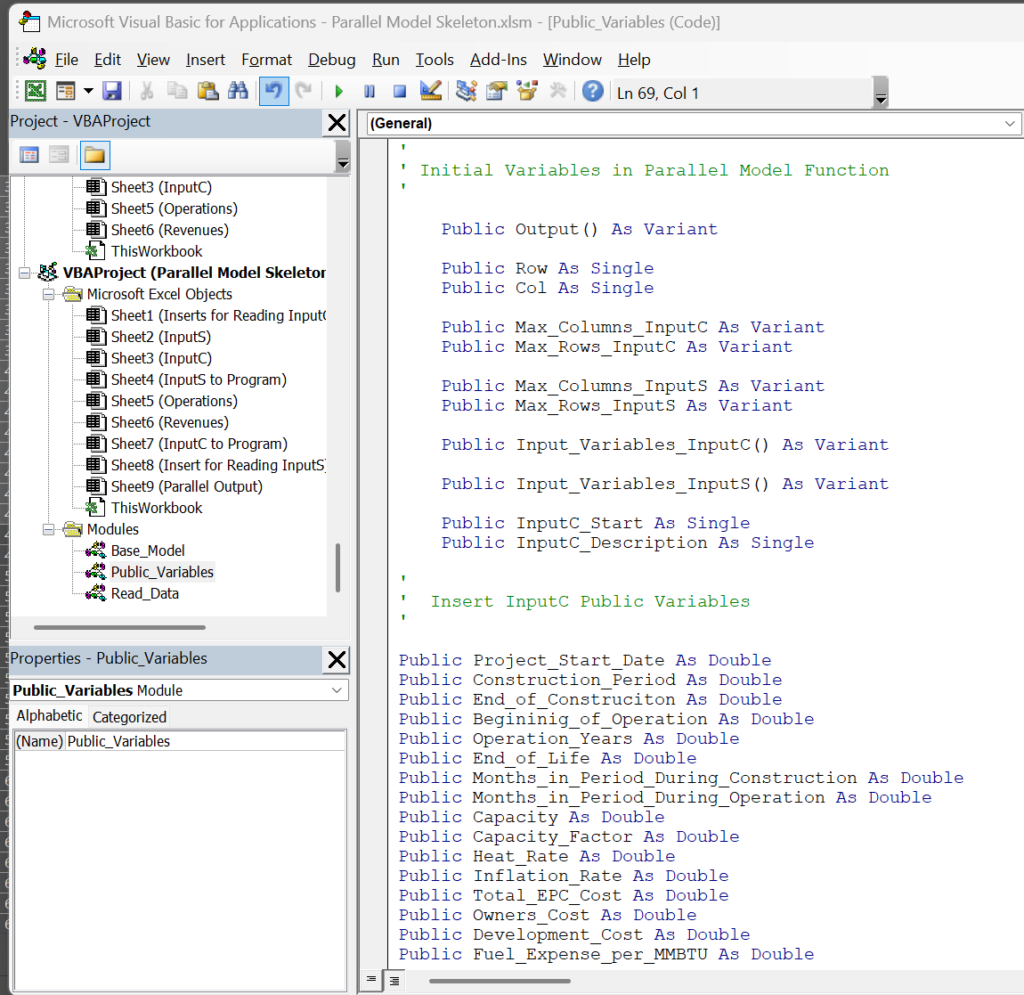
Step 5: Go to the page named “InputC to Copy to Program”. Find the module called Public Variables you created (or are created by AI) and insert the public variables. Do the same thing for InputS public variables. Copy the public variable definitions into the public variable module as shown in the second screenshot.
.
.
.
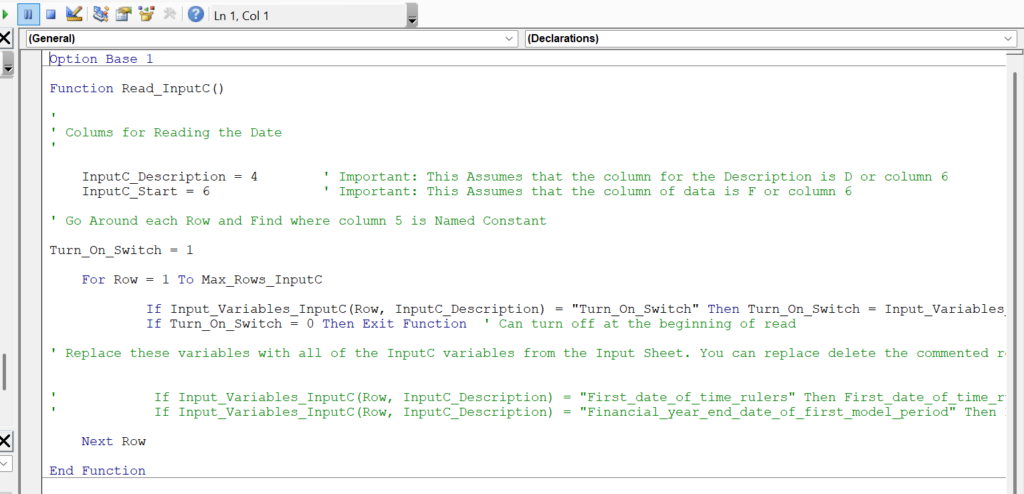
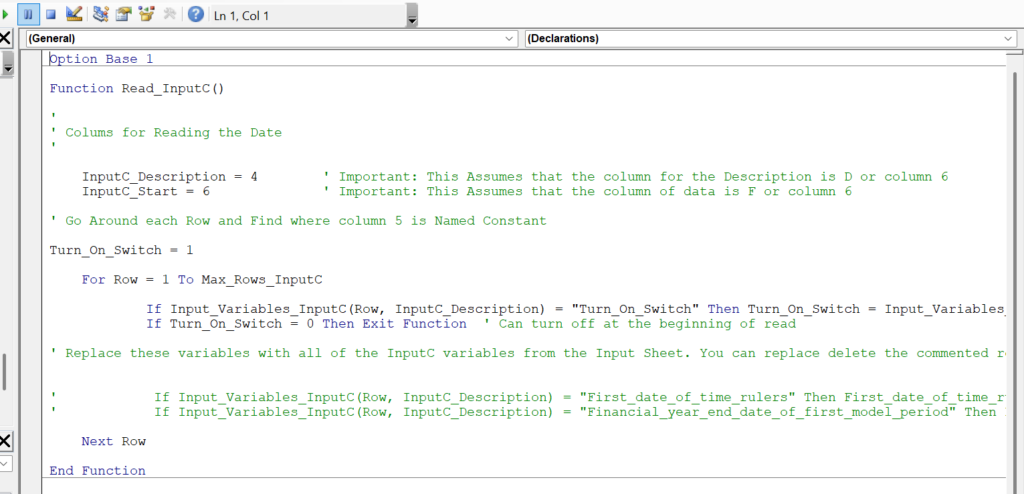
Step 6: Insert the code for assigning the data from the Inserts from InputC and the Inserts from InputS code to the skeleton code that is in the Read_Data module. The skeleton module contains a comment as where to put the data as shown in the screenshot below.
.
.
Once you copy the code (like when you copy code using AI), the read input program should look something like the following.
.
.
Note that should be the same for the InputS
.
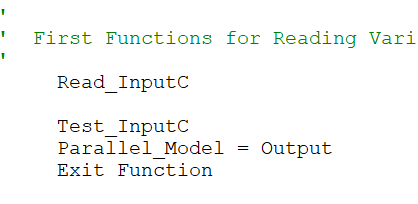
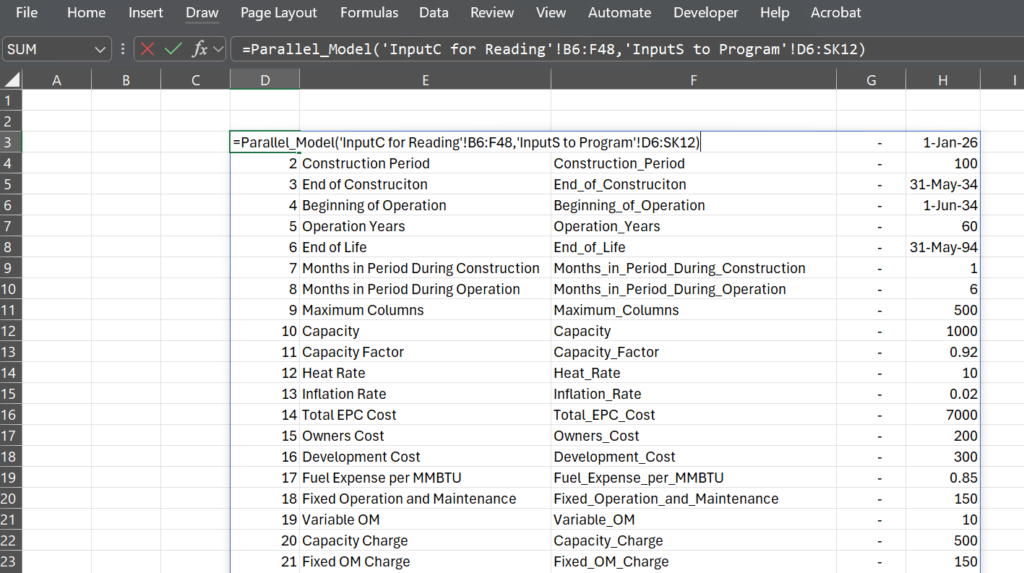
Step 7: Optional: You can test whether the items are read in by removing the single quotes in the base program. The amounts that you read should be read out in the output program.
.
.
.
.
Step 8: Let AI help you in converting each calculation sheet to VBA. Here are some of my prompts. The key is to have a little understanding as to what you want.
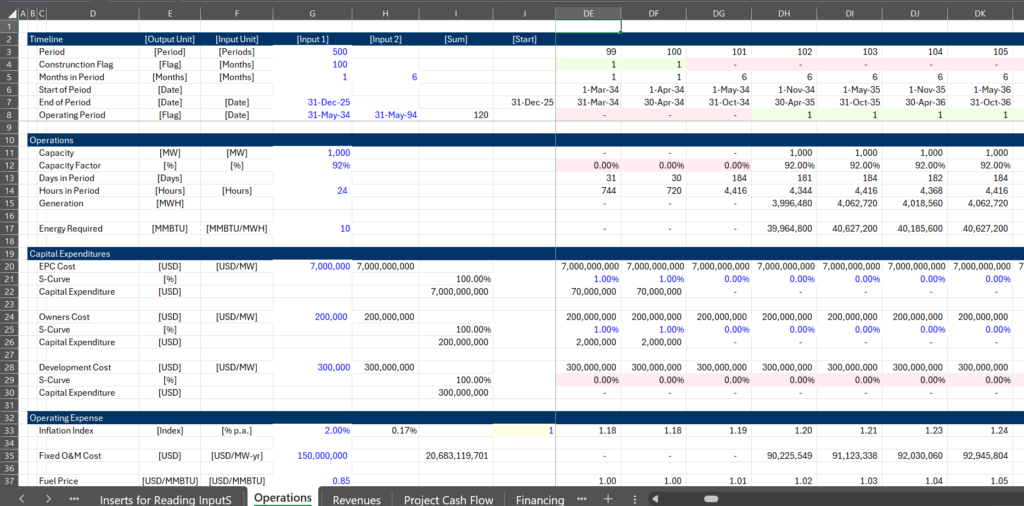
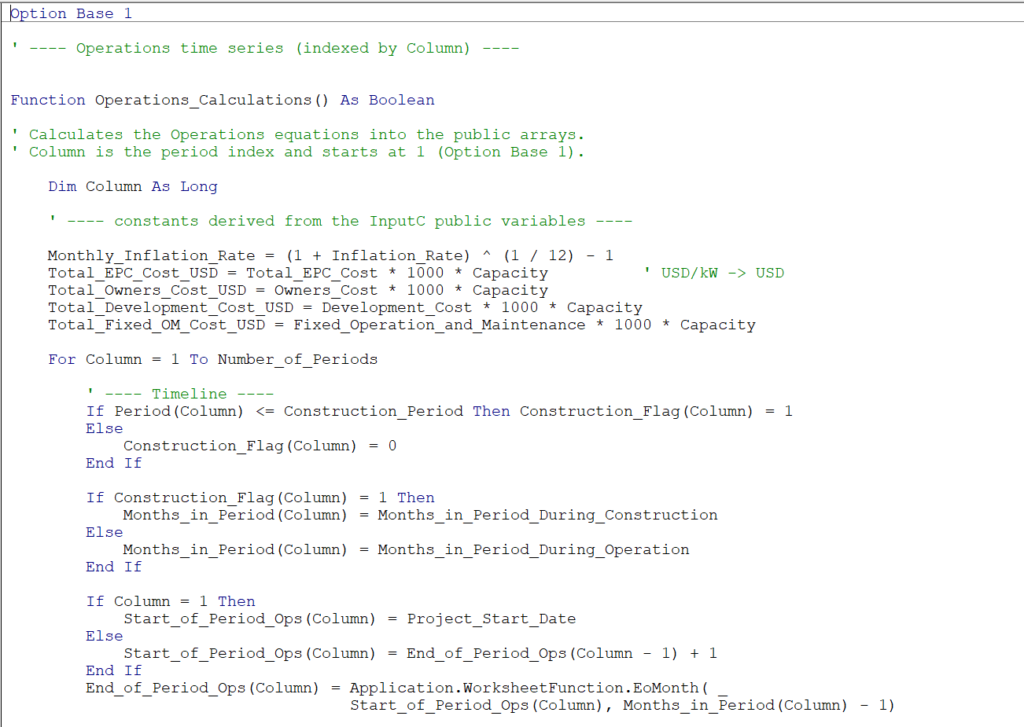
Can you use the public variables defined and the read inputs in the vba code to create a function with the equations in this sheet. Could you only create the columns starting in column k. Can you use a for loop with the name column as indices for each equation.
I did not agree with many things in the calculastions. First, I do not want the output and I do not want the CONST statements. Second there is no need for the offset and all of the calculations can be directly made with an index named column which will start at 1 because of the adjustment in the way I defined inputs. Third could you use input base 1 as I think this is much better.
Can you do it with option base 1 instead of being arrogant and can you explain why there is a negative sign in the period calculation. it does not make sense
Once you let AI replicate the excel calculations are converted as shown in the two excerpts below.
.
.
.
Step 8: Insert the template base function, read functions and public variabbles.
Copy Code from Excel to VBA, While Using AI to Debug Programs.
.
The excel model with completed VBA code and a sheet that translates elements of the financial model to VBA code for the simple model and the more complex model are attached to the two buttons below.
.
The steps for completing this process and a video explaining the process are shown below.
,
Increasing Speed with C++ or Python
Some arrogant people will tell you that in creating a parallel model, you should use another program like python or C++. These languages do process mathematical equations faster than VBA. The advantage of VBA is that you do not have to go in and out of excel in order to implement the programs.
AI does a good job in translation just as if you translate from French to English. The helpful thing about AI in developing the parallel model is translating from excel to VBA. Once VBA is established you can translate the code to either C++ or python as illustrated in the screenshots below.
.